Hi new to all this. Apologies. When running the initial calibration for servo 11 nothing seems to happen. The powershell window displays servo 0 set to zero though servo 11 set to zero but the cursorjust blinks and the task never completes. The servo does not move when plugged in. I have tried runnng the I2C and SPI interfaces several times. I have tried rebooting the pi several times. ANy help is appreciated. Please let me know if I can provide any more info. Thanks for help with this.
It is recommended to provide a video of the issue for us to review, which will help us analyze and resolve the problem for you.
The servo’s angle range is -90° to 90°. However, the angle set at the factory is random—it could be 0°, 45°, etc. If we assemble the robot directly using these random angles, it may cause severe issues when running the code, such as chaos in robot movement, servo jamming, or even servo burnout.
Therefore, we need to set all servos to 0° before installation. This ensures that, regardless of the direction of rotation, the servo starts from the midpoint.
To confirm that the servo is correctly set to 0°, first insert the servo arm into the servo shaft, then gently rotate the arm to different angles. This arm is only for visual confirmation that the servo is rotating.
Run the servo zeroing code:
sudo python3 servo_zeroing.py
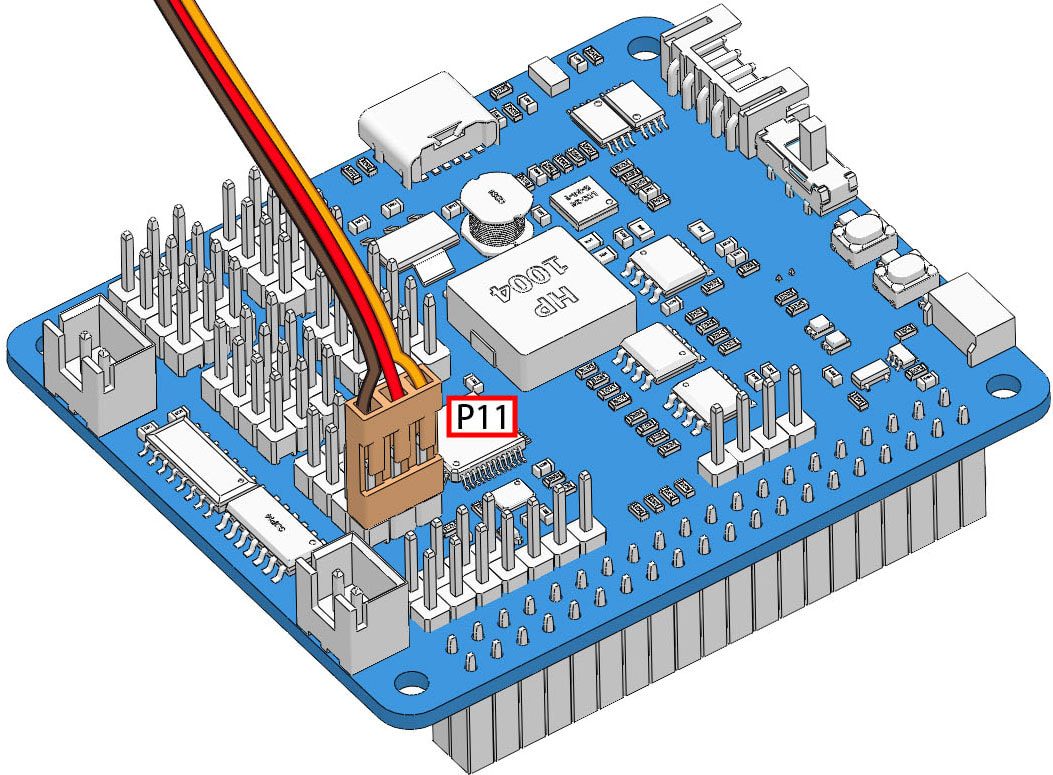
Next, insert the servo cable into the P11 port as shown in the figure below. You will see the servo arm rotate to a specific position (this is the 0° position).
Now, remove the servo arm while keeping the servo cable connected to P11. Do not power off. Then proceed with the assembly according to the paper instructions.
It seems as though several reboots was enough to resolve the issue. Thanks.