My PiDog no longer outputs sound. I don’t get any error messages. I checked the sound volume in the alsamixer to make sure it was set just below the red zone at about 80%. I reinstalled all the modules. Finally I formatted the SD card and reinstalled Bookworm and all the modules. Still no sound. All the other components function properly and the projects work as expected but without sound. My robot hat is v4 so I believe the speaker is defective.
-
Adjust Volume via Terminal
Run the alsamixer command in the terminal. Press F6 to switch between sound card devices, then use the up/down arrow keys to adjust the volume. Finally, press ESC to exit. Please check if the speaker volume increases after this adjustment. -
Inspect the Speaker
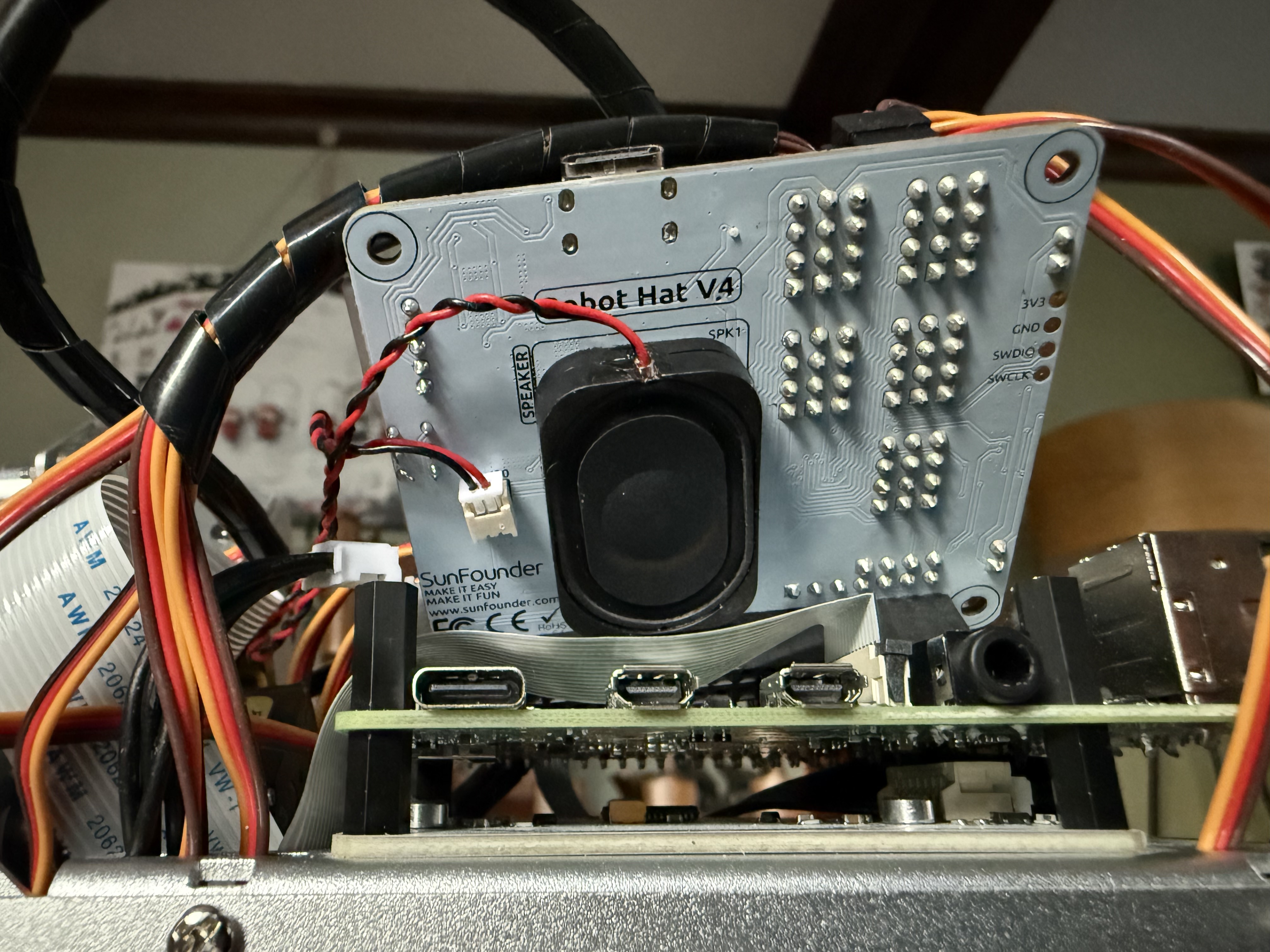
Please remove the robot-hat and check the condition of the speaker on the back. Another possible cause is that a metal heatsink installed on the Raspberry Pi’s CPU may be pressing against the speaker diaphragm, preventing it from producing sound.
For Item 1, I have already performed these steps. For Item 2, I removed the hat and attached a picture. I previously removed the heatsink due to clearance issues.
As stated previously, I formatted the SD card and reinstalled Bookworm and all the modules. I still have no sound however everything else is functioning as expected.
Please contact service@sunfounder.com to get a robot hat.